
What Hive Foreman is for
Hive Foreman is available for iPhone and iPad. Download Hive Foreman on the App Store. This guide covers version 1.0.
Hive Foreman keeps the practical records for your apiaries in one place. You can see what needs attention, record what you find at a hive, plan the next job and look back at the history later. The app works on iPhone and iPad. You do not need to create an RGT Software account.
Your working records are kept on your device. If you turn on Private iCloud, saved changes can also be copied through your own Apple Account so they are available on your other Apple devices. You can use Hive Foreman without turning this on.
Start the app for the first time
- Open Hive Foreman.
- Choose Get started if you want the short setup guide, or Later if you prefer to explore first.
- Choose Add apiary.
- Enter a name that you will recognise, such as the yard, farm or site name.
- Add a location and notes if they will help you identify the place.
- Choose Save.
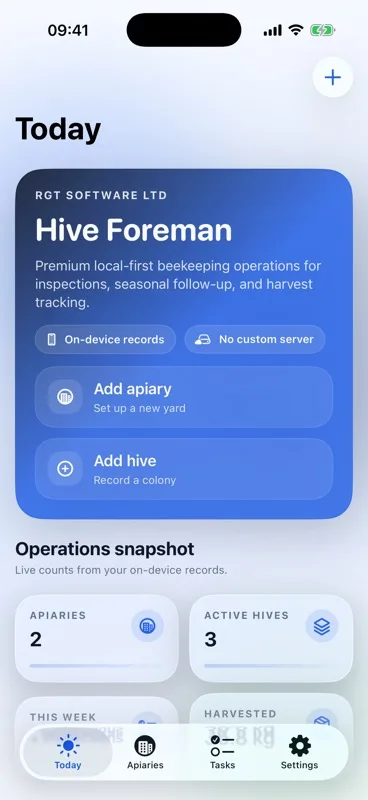
The setup checklist on Today leads you through adding an apiary, adding a hive, logging an inspection, adding follow-up work or a harvest, and checking the details used in shared reports. You can hide the checklist when you no longer need it.
Use the four main pages
- Today brings together overdue work, work due soon, this week's checks and quick ways to add a record.
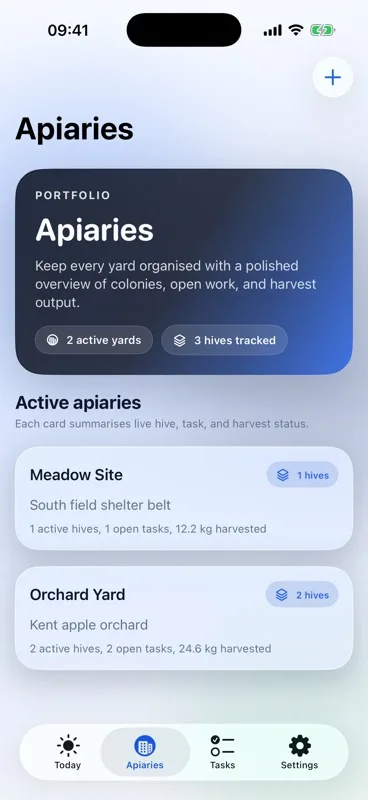
- Apiaries lists your yards or sites and the hives that belong to each one.
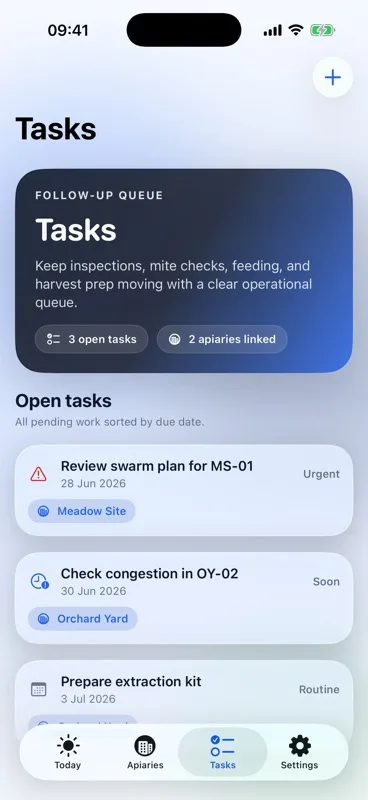
- Tasks shows open, due-soon, overdue and completed work.
- Settings contains backup, Private iCloud, spreadsheet tools, the timeline, equipment, cashbook, business details, subscription controls and help.
Add and organise apiaries
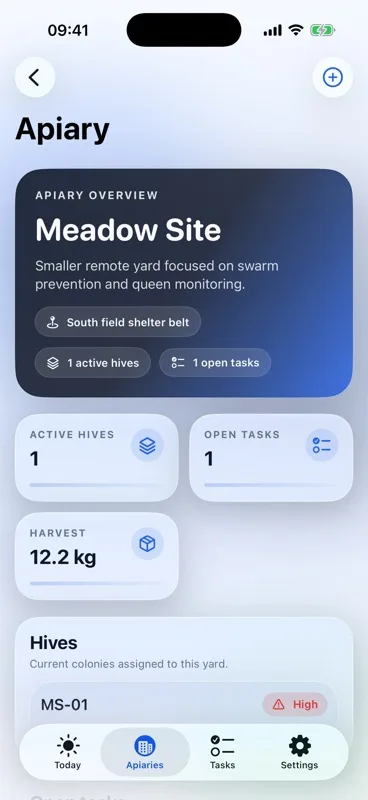
An apiary is the yard or site where one or more hives are kept. Open Apiaries, choose Add apiary, enter the name and save it. Open an apiary to see its active hives, open tasks and harvest total.
Use Flowers and weather inside the apiary to keep your own notes about forage, flowering plants, local conditions and temperature. These are your observations. Hive Foreman does not fetch a weather forecast or identify plants for you.
Add a hive
- Open the apiary where the hive is kept.
- Choose Add hive.
- Enter a clear hive name or code.
- Add the details you already know. Leave anything unknown rather than guessing.
- Choose Save.
A hive record can hold its current condition, queen details, supers, inspections, tasks, feeding, treatments, harvests and history. Use Field order to put the hives in the same order you meet them at the apiary.
The free plan allows up to three active hives in each apiary. If adding another hive would go over that limit, Hive Foreman explains why and offers a route to the subscription choices. It does not discard the details you entered without warning.
Open the right hive quickly
A hive can have a private QR label. Open the hive and choose the label option to create or review it. Print or share the reviewed label, then use Scan hive label when you need to open that hive again. The scanner uses the camera only after you choose it. Manual lookup remains available if a label is damaged or scanning is not convenient.
Log a quick observation or full inspection
Use a quick observation for a short field note. Use a full inspection when you want to record more detail. Depending on what you check, a full inspection can include colony strength, queen information, brood, temperament, swarm risk, varroa observations, feeding, treatments, supers, photos and follow-up notes.
- Open the hive.
- Choose Log inspection.
- Check the date and choose the type of record you need.
- Fill in only what you actually checked.
- Add photos or a spoken draft if they will make the record more useful.
- Read the record back, then choose Save.
If you use a spoken draft, Hive Foreman puts the words into an editable note. Read it carefully before saving, especially hive names, dates, numbers, units and words such as “not”. The app does not keep the audio recording. Speech recognition may use an Apple service depending on your device and settings.
Saved inspection layouts can restore the sections you usually use. A layout saves time, but it never fills in a finding for you.
Add photos safely
You can take a new photo or choose one you already have. Hive Foreman keeps an app-owned copy with the related record. Shared copies remove the original camera, device and location details. Check every photo before including it in a report or sending it to someone else.
Turn a finding into follow-up work
Add a task while the reason is still clear. Give it a useful title, choose the apiary or hive, set the due date and add a reminder if you want one. Today and Tasks then bring urgent work together.
The free plan allows eight open tasks. When the limit is reached, Hive Foreman keeps you on a safe screen, explains the limit and gives you a route to the subscription choices.
For repeating work, choose how often it should return and what should happen if dates are missed. Missed dates stay together on one task record instead of filling the list with duplicate cards. You can complete, skip or reschedule work without losing its history.
Archive and restore records
Archive an apiary or hive when it is no longer active but you still need its history. Repeating tasks and reminders linked to that record are paused as well. If you restore the apiary or hive later, its repeating work starts again from the restoration date rather than creating reminders for the whole archived period.
Archiving is not the same as deleting. Use it when you may need the record again.
Keep colony history accurate
Use the dated history actions when a queen changes or a colony moves, splits or merges. These actions keep older inspections attached to the colony they described. Review the source and destination before saving a move, split or merge.
Record feeding, treatments and varroa observations
Add feeding, treatment and mite information to the hive where the work happened. Record the date, what was used, the amount or observation, and any note you will need at the next visit. Hive Foreman stores what you enter; it does not recommend a medicine, dose or treatment plan.
Record a harvest
Use a hive harvest when the yield belongs to one hive. Use an apiary harvest when the yield was pooled across the site. Add the date, weight and useful notes, then check the total before saving. Hive Foreman keeps currencies and harvest weights separate from one another and does not turn a harvest record into an invoice.
Work on several hives
Open Work on several hives in Settings when the same task, feeding record or reviewed setup applies to more than one hive. Choose the destination hives, check each one and review the summary before saving. Nothing is copied until you confirm the reviewed batch.
Track equipment and supplies
Open Equipment and supplies in Settings to record reusable equipment, stock, where it is kept and what needs attention. This helps you prepare before travelling to an apiary. Keep quantities and maintenance notes up to date rather than treating the list as an automatic stock count.
Use the cashbook
The optional cashbook can record sales, other income, expenses and refunds. Add the date, amount, currency, category and any note or receipt that will help later. Each currency is kept separate, and corrections remain in the record history.
The cashbook is a simple working record. It is not an accounting, tax, banking or invoicing service. Check important figures against your own paperwork and professional advice.
Find older work
Open Timeline and summary in Settings to see saved work in date order. Use search when you know the apiary or hive you need. The timeline can bring together inspections, tasks, queen changes, harvests, yard notes, equipment and cashbook entries without changing the underlying records.
Keep records on your Apple devices with Private iCloud
Private iCloud is optional. It uses the private part of your own Apple iCloud account; it is not an RGT Software account or a public shared database.
- Make sure the device is signed in to the Apple Account you want to use.
- Open Settings in Hive Foreman.
- Choose Private iCloud.
- Read the explanation, then turn it on.
- Leave Hive Foreman open while the first copy finishes.
After setup, a successfully saved change or confirmed deletion is queued for iCloud automatically while the app is open and connected. An unfinished form is not copied, and cancelling a form does not create a change. Rapid saves are grouped so the app does not start unnecessary copies.
If the same record was changed differently on two devices before they could exchange updates, Hive Foreman asks you to review the conflict. It does not silently choose one and erase the other. Read both versions and select the one you want to keep.
Private iCloud is not a replacement for a backup. Keep a separate backup before a large import, replacement or important seasonal change.
Create and restore a backup
Backup and restore are free for everyone, including when your records are above the free hive or task limits.
Create a backup
- Open Settings.
- Choose Backup and restore.
- Choose Create backup.
- Choose where to keep the file in Files.
A backup includes the supported Hive Foreman record types. It is a private file, so keep it somewhere you trust.
Restore a backup
- Create a current backup first if you may need to return to the records already on the device.
- Choose Choose backup to restore.
- Select the backup file.
- Read the preview. Selecting the file does not replace anything.
- Choose Replace records from this backup only when you are certain.
Restore replaces the current Hive Foreman records on that device; it does not merge them. Choose Cancel restore to return without replacing anything.
Use spreadsheet files
Add spreadsheet records lets you review suitable CSV records before adding them. One successful CSV import is free on each device, provided the records stay within the free limits. Later imports require Pro. A cancelled or failed import does not use the free allowance.
Save spreadsheet exports records for your own use and requires Pro. A spreadsheet is not a complete backup. Use Backup and restore when you need a full recoverable copy.
Create reports and summaries
Choose the apiaries, hives and sections you want to include, then preview the result before sharing it. Reports and summaries use only the records you select. You can add optional business details and a logo when a more formal document is useful.
Always read a generated file before saving or sending it. Closing the share sheet or swiping it down safely returns to the preview and does not need a cancellation warning.
Add business details
Open Business profile in Settings to add the name and contact details you want available for reports. These details are optional. Do not enter private information that you do not want to appear in a file you choose to share.
Use Hive Foreman Pro
The free plan is designed to let you start with real records. Pro removes the active-hive and open-task limits and unlocks the current paid import, export and sharing features. Open Subscription in Settings to compare the choices. Apple shows the current price, renewal period and purchase terms before you confirm anything.
The subscription screen includes Restore purchases, Manage subscription, Privacy policy, Terms of use, Support and a safe way to return without buying. A paywall explains why you reached it and does not trap you.
Use Hive Foreman on iPad
Hive Foreman is a native iPad app, not an enlarged iPhone app. It can use the full screen, rotate between portrait and landscape, and remain usable in a narrow app window. Some wider layouts keep related lists and details visible side by side. An unfinished form should remain in place when the window size changes.
Fix common problems
A record will not save
Read the red message beside the missing or incorrect field. Add the required name or value, then try Save again. Your other entries should remain available while you correct it.
The keyboard covers a control
Use the visible Done control above the keyboard. Closing the keyboard does not save or discard the form.
A change has not appeared on another device
Confirm that Private iCloud is on in Hive Foreman on both devices, both devices use the same Apple Account, and both have an internet connection. Open Hive Foreman on each device and allow time for the saved change to arrive. If the app asks you to review two versions, choose the correct one rather than repeating the edit.
Pro should already be active
Open Subscription and choose Restore purchases. Make sure the device is signed in to the Apple Account that made the purchase. If Apple reports a problem, check the internet connection and try once more.
The app cannot open its saved records
Choose Try again. If the problem continues, choose Contact support. Hive Foreman prepares an email to support@rgtsoftware.com with the app error, device type and iOS version. You can read and edit the email before sending it.
Get support
Visit Hive Foreman Support or email support@rgtsoftware.com. Tell us what you were trying to do, what happened, the device you used, the iOS or iPadOS version, and the Hive Foreman version and build shown at the bottom of Settings. Do not send a backup or private hive records unless support specifically asks for a safe example.